
Prefer the product overview instead of the internals? Read the high level SitSense explainer.
High Level Overview
Most posture tools either stream video to a server or depend on dedicated hardware. SitSense takes a different route. All posture analysis runs in the browser. The server only receives a compact JSON payload of posture metrics and a score.
In practice, a SitSense session looks like this:
- The browser uses
@mediapipe/poseand a face landmarker to estimate landmarks. - TypeScript utilities convert those landmarks into seven ergonomic metrics and a posture score.
- React renders a live coach view with scores, streaks, and points. Frames never leave the tab.
- Every few seconds we send structured posture metrics to a Postgres and Supabase backend, then use an LLM to summarize the session.
Browser Pipeline With MediaPipe and React
The core of SitSense is a React client component called MediaPipeProcessor. It takes care of webcam access, model setup, and the real time loop that drives the UI.
At a high level, the client does the following:
- 01
Requests webcam access through
getUserMediaand attaches the stream to a hidden video element. - 02
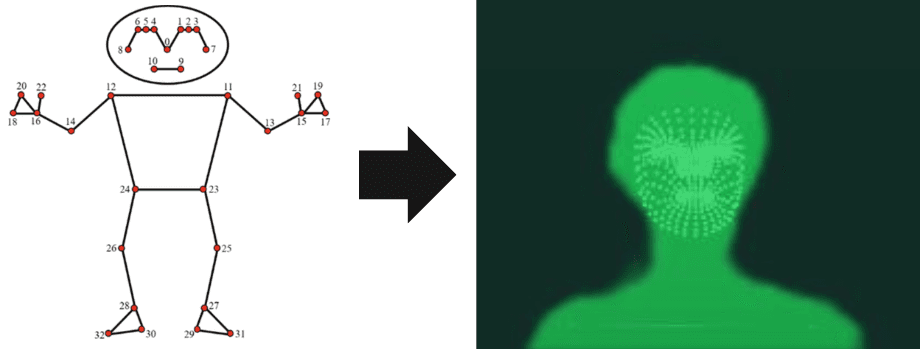
Runs MediaPipe Pose on incoming frames to get a 2D body skeleton with 33 landmarks.
- 03
Runs a lightweight face landmarker at a lower frame rate to estimate 3D head pose.
- 04
Sends pose and face data into
calculatePostureMetricsto compute seven angles and offsets. - 05
Updates the on screen posture score, streak timers, and points in React, while throttling metric saves to the backend.
Anything that changes every frame lives in refs, not state. This keeps React from rendering on every camera frame and lets the UI feel responsive without turning the component into a frame loop.
From Landmarks to Posture Metrics
Raw landmarks are noisy and hard to reason about. SitSense converts pose and face data into a small set of ergonomic metrics that match how clinicians think about neck and shoulder strain.
The current model tracks seven metrics:
- Neck angle relative to vertical.
- Craniovertebral angle (CVA), a standard head–neck alignment measure.
- Trunk angle to capture torso lean.
- Shoulder slope, which shows side loading.
- Head forward relative to the torso.
- Head tilt or roll.
- Neck turn or yaw.
For 3D head pose, SitSense builds a simple orientation matrix from the face mesh and then uses helper functions such as rollFromMatrix, yawFromMatrix, and depthFromMatrix. These isolate tilt, rotation, and forward drift in a way that is stable enough for live feedback.
Each metric is scored by a dedicated function and normalized against a shared threshold table. This produces a compact PostureMetrics object and a posture state of good, fair, or poor for the current frame.
Calibration, Smoothing, and Human Feel
Posture is personal. A fixed threshold for every user creates a noisy experience. SitSense leans on warmup windows and rolling baselines to adapt to the person sitting in front of the camera.
- Warmup frames ignore the first set of samples for each metric. During this period the UI stays neutral rather than pretending to know your baseline.
- Rolling history buffers keep around thirty seconds of data for key metrics at a reduced frame rate. Baselines blend medians with exponential moving averages.
- Calibration aware classification hides or softens scores until the system is confident that a metric has settled.
The goal is simple. SitSense should say you are drifting forward relative to your own neutral, not relative to a model neck in a textbook.
Points, Streaks, and the Game Loop
SitSense is not just a meter on the side of the screen. There is a small points engine behind the scenes that turns posture into a loop you can stick with.
The PosturePointsEngine receives posture updates from the pipeline, including:
- Current posture state such as good or fair or poor.
- How long you have stayed in good posture.
- When and how you recover after a slouch.
It emits points events such as a ten second streak bonus, a longer focus streak, or a recovery bonus. React components like PointsCounter and PointsToast display those events without polling.
Streak timers rely on high resolution time stamps rather than a simple interval. They schedule and reschedule timeouts when posture changes, which keeps streaks accurate even if the tab drops frames for a moment.
What the Backend Sees and Stores
When SitSense does talk to the server, it sends a small, typed JSON payload. There is no route that accepts image bytes or serialized canvas data.
POST /api/posture/save
{
  session_id: "uuid",
  user_id: "uuid",
  metrics: {
    neck_angle: number,
    cva_angle: number,
    trunk_angle: number,
    shoulder_slope: number,
    head_forward: number,
    head_tilt: number,
    neck_turn: number
  },
  posture: "good" | "fair" | "poor",
  confidence: number
}
The server validates this payload with Zod and stores it in a posture_analysis table in Postgres through Supabase and Drizzle. Writes are rate limited per user so that a long session generates a reasonable number of rows instead of a full frame log.
Compressing Sessions for LLM Analysis
Raw time series are noisy and costly to send to an LLM. SitSense compresses each session into a short sequence that still captures the story of your posture.
- 01
Fetch all posture rows for a session from
posture_analysis. - 02
Bucket samples into five second windows and pick the worst metric in each bucket.
- 03
Map each combination of metric and severity to a letter in a limited alphabet.
- 04
Build a strict prompt that includes the mapping but forbids the model from echoing the code letters.
- 05
Ask the LLM for a short, plain text summary and store it alongside the aggregates in a
sessions.analysisfield.
The LLM never sees individual metric values or timestamps, only the compressed sequence and session length. The result feels human and readable without giving up the privacy story.
Why Never Uploading Video Matters
Keeping analysis in the browser is not just a technical choice. It is a trust choice. Many remote workers sit in front of sensitive documents and calls all day. The idea of piping that video to a server for posture tracking is a nonstarter.
By design, SitSense has no endpoint that accepts frames. The network surface is limited to authentication, numeric posture metrics, and server side LLM calls based on encoded sequences.
That is why product copy can say that all posture analysis happens locally in your browser and that only numeric metrics are stored for trends. It is how the system actually works.
Notes for Developers
If you want to build something similar, here is the current SitSense stack and a few implementation details that have helped in production.
- Client: Next.js App Router, React, TypeScript,
@mediapipe/pose,@mediapipe/tasks-vision. - State discipline: per frame values in refs, state updates only when the UI needs to change.
- Backend: Next.js API routes, Supabase, Postgres, Drizzle ORM, Zod for validation.
- Analysis: Gemini models behind a strict prompt, with retries and model fallbacks.
The same architecture could support other ergonomic use cases such as lifting form checks or standing desk posture without changing the privacy story. You would update the metrics and thresholds, not the basic flow.
Technical FAQ
- Does SitSense ever store or replay my webcam video?
- No. There is no code path that serializes frames, calls canvas.toDataURL, or uploads screenshots. All posture analysis happens in the browser, and only numeric metrics plus labels are sent to the server.
- Can I adapt this approach to another posture or movement use case?
- Yes. The same structure works for any posture or movement problem where landmarks are available. You would adjust the metric calculations, scoring thresholds, and session summaries while keeping the browser first design.
- What happens if the browser drops frames?
- SitSense decouples the scoring and streak timers from the raw frame rate. Time based streaks rely on high resolution time stamps and rescheduled timeouts, so short frame drops do not break streaks or scores.
The short version
Seven angles, read in the browser you are reading this in.
No server does the maths and no frame leaves your machine.
Free to start. Nothing to install.
Read next
AI Posture Trackers vs Wearables: Accuracy, Cost & Privacy Compared (2026)
Webcam AI tracks 7 posture metrics for free. Wearables cost $80-100 and measure one. Full comparison of accuracy, setup, privacy, and real user results.
Top 5 SitSense Alternatives in 2026: Honest Comparison of Posture Tracking Tools
We tested every major posture tracker in 2026 — wearables, webcam AI, and mobile apps. Side-by-side comparison of accuracy, price, and privacy for each.
Last updated March 2026